

CAS LP-1000N Manual, Explained: Setup, PLUs, Labels and Calibration
This LP-1000N manual guide walks you through setup, label loading, PLU programming and error codes for the NTEP CAS LP-1000N label printing scale (30 lb x 0.01 lb), on sale for $1,395.00 (regular $1,479.00), in stock.
Short answer: the CAS LP-1000N owner’s manual covers installation, loading the label roll, REG-mode weighing with PLUs and tare, PROGRAM mode (PLUs, 54 preset keys, ingredient messages and the SET menu for date, time and labels), reports, the printhead check, scale-to-scale transfer and error codes. Span calibration is done by a CAS dealer. MNM Scales is an authorized CAS dealer, stocks the NTEP CAS LP-1000N at $1,395.00 and its LST labels, and calibrates it in-house for $250 with certificate or $595 with a NIST-traceable certificate.
Retail and label scale guides from MNM Scales
- CAS LP-1000N manual, explained (you are here)
- Deli scale with label printer: Torrey W-Label vs CAS LP-1000N
- Meat scale buying guide
- Produce scale buying guide
- Best scale for farmers markets
- Scale error codes explained
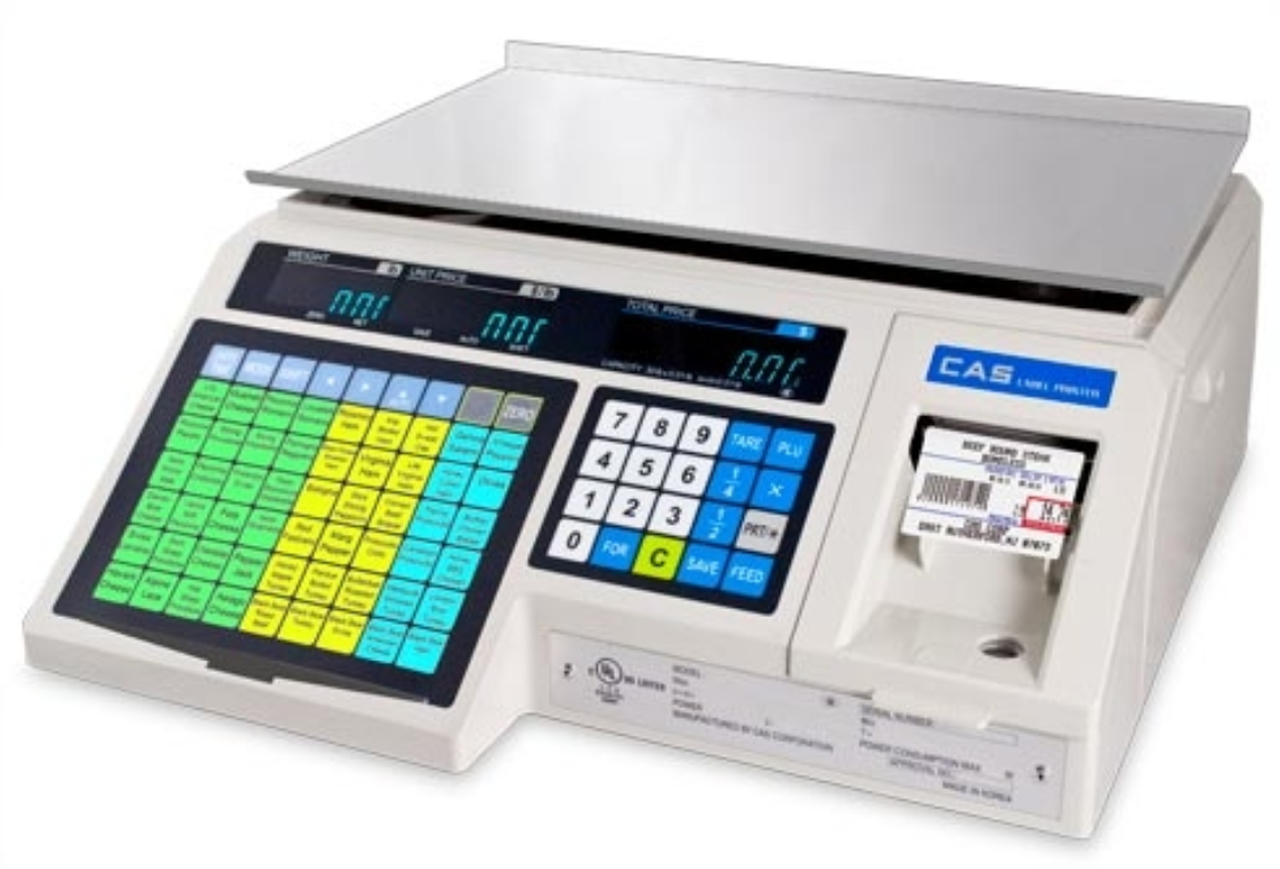
The CAS LP-1000N is a 30 lb x 0.01 lb price-computing label printing scale for delis, meat and seafood counters, produce, bakeries and back-room pre-pack. It stores 4,000 PLUs and 1,000 ingredient messages and prints labels with weight, unit price, total, dates and a UPC barcode on a built-in direct thermal printer. This page follows CAS’s LP-1000N owner’s manual, the LP-1000N USB owner’s manual, the label set-up quick reference, the CAS LP-1000N Series spec sheet and NTEP Certificate of Conformance 92-169. Choosing between label scales first? Start with our deli scale with label printer guide.
LP-1000N manual at a glance: specifications
| Item | CAS LP-1000N |
|---|---|
| Capacity x graduation | 30 lb x 0.01 lb |
| Display | VFD (vacuum fluorescent) for weight, unit price and total price |
| Printer | Direct thermal label printer; 30 standard label formats |
| Labels | 58 mm wide, 30 mm to 100 mm long; gapped (die-cut) or continuous strip |
| Memory | 4,000 PLUs; 1,000 ingredient messages (50 characters x 8 lines); 54 preset keys |
| Commodity name | 2 lines of 28 characters per PLU |
| Interface | RS-232C and USB; PC to scale, scale to PC and scale to scale PLU transfer |
| Power | AC 110/120/220/240 V, 50/60 Hz; 100 W max |
| Operating temperature | 14 °F to 104 °F (-10 °C to 40 °C) |
| Platter | 15.75 x 9.65 in stainless steel |
| Dimensions / weight | 16.1 x 16.9 x 7.8 in (W x D x H); 28.66 lb |
| Approvals | NTEP Class III, CC 92-169 (nmax 3,000); Measurement Canada AM-5590 |
| In the box | Scale, stainless platter, USB A-B cable, ground cable, starter roll of LST-8010 labels, owner’s manual |
| Warranty (CAS) | One year |
Setting up the LP-1000N
- Use it indoors in a dry, liquid-free spot on a flat, stable counter, away from oscillating fans, vents, drafts and other electromagnetic devices.
- Level the scale: turn the 4 legs until the bubble sits inside the circle of the leveling gauge.
- Plug into a proper, grounded outlet near the scale (a ground cable is included) and let it warm up for 30 minutes before use.
- Set the date (SET #1, entered as day-month-year) and time (SET #2, hours-minutes-seconds) so packed-on and sell-by dates print correctly.
- Load the label roll and pick the label type and format (next section).
A small rechargeable battery keeps only the date and time; it charges while the scale is on and does not hold programmed PLUs.
Loading labels and setting the label format
- Remove the printer front cover and side cover. A threading diagram is printed inside the side cover.
- Remove the label roll pin and pick-up pin, lift the print head release lever, and clear any old backing paper and roll core.
- Peel off about 3 labels from the new roll. Thread the backing over the paper pressure shaft, between the two green sensor caps, under the label guide roller, over the red rubber roller and under the print head (never touch the underside of the print head), over the peel-off bar, under the return roller and around the pick-up spool.
- Attach the pick-up spool pin and turn it slowly counterclockwise to tighten the backing. Push the print head down until it locks, then replace both covers.
Label type: press 1 then MODE (“PLU”), scroll to “SEt”, press PRT/*, enter 4 and press PRT/* (“LAbEL EntEr 1”), then press 5. Enter 0 for gapped labels or 1 for continuous strip, press PRT/*, press C twice and turn the scale off and on. Label format: in the same SET #4 menu press 2 (“LAbEL ForMAt X”), enter the format number from the label-format charts in the manual’s appendix that matches your roll, and press PRT/*. Shop the matching CAS LST-8010 UPC labels or all label printing scales and labels.
Keys and everyday weighing (REG mode)
- PLU sale: type the PLU number and press PLU, or press one of the 54 speed keys; place the item; press PRT/* to print.
- Non-PLU sale: type a unit price, place the item, press PRT/*.
- TARE: known tare: type the value (for example 1, 0 for 0.10 lb) and press TARE. Unknown tare: set the empty container on the platter and press TARE. To clear, empty the platter and press TARE.
- FOR: by-count pricing, such as 5 pieces for a set price.
- X: prints several identical labels; enter the quantity, then PRT/*.
- SAVE: keeps a recalled PLU’s unit price and tare after the item comes off the platter (press again to turn it off).
- AUTO mode: the scale prints automatically when the weight is stable and above 100 g; the AUTO lamp shows in the unit price display.
- FEED issues a blank label; ZERO re-zeros the scale; C clears errors.
Programming PLUs, preset keys and ingredients
Enter PROGRAM mode by pressing 1 then MODE. The menu runs PLU, PreSet, MSG, HEAD, SHOP, SET and INIT.
- At “PLU” press PRT/*. The display shows how many empty PLUs are left. Type a PLU number from 1 to 4,000 and press PRT/*.
- Item code (1 to 999999; usually the same as the PLU number, 0 prints no code), then the name on up to 2 lines of 28 characters.
- Message number (0 to 1,000) links an ingredient message to the item.
- Price, then shelf life in days (0 to 999). Sell-by date = packed-on date + shelf life.
- Tare for the item’s container, then group code (0 to 99) to group departments such as beef or poultry.
- At “SAvE” press PRT/* to store the PLU. Press C when you are done.
Preset keys: after initialization, preset 1 calls PLU 1 through preset 54 for PLU 54. To reassign one, open “PrSEt”, press the speed key, type the PLU number and press PRT/*. Ingredients: open “MSG”, pick a message number from 1 to 1,000 and type up to 8 lines of 50 characters. HEAD sets the 2-line name for non-PLU labels, and SHOP sets the 2 lines (such as store name and address) printed at the bottom of each label.
Reports, printhead check and PLU transfer
- ACCOUNT mode: press 2 then MODE. X reports read sales totals (grand total, all PLUs, individual PLU, non-PLU); Z reports print and reset them.
- CHESS printhead check: prints test patterns so you can spot burned-out or shorted dots on the thermal printhead.
- Scale-to-scale transfer (trAnS): connect two scales with a 25-pin to 25-pin crossover cable (CAS part J11), set the same baud rate (SET #9), leave the loaded scale in sale mode and run trAnS on the empty one.
- PC link: with the scale off, slide the RS-232/USB switch to the port you will use, then power on. USB uses the included A-B cable; RS-232C uses a 9-pin to 25-pin cable (sold separately). A USB-to-serial converter is not included.
LP-1000N error codes and fixes
| Display | What it means / what to do |
|---|---|
| Error 1 / Error 2 | PLU number does not exist or is out of range; check the number (1 to 4,000) |
| Error 3 | Weight not stable, or keys pressed before it settled; wait for a stable reading |
| Error 6 | PRT/* pressed while the printer control switch is set to STOP |
| Error 7 / Error 9 | RS-232C cable wiring, a break in the cable, or a communication error; check the cable and retry |
| Error 10 / Error 11 | Tare entry not valid or out of range; tare must be 0.01 to 30.00 lb with the NET lamp off |
| Error 13 | Label attempted with a 0.00 price or a negative weight |
| Error 14 | Label roll used up or off the sensor; reload labels between the green sensor caps, press C, then FEED |
| Error 15 | Remove the issued label, close the printer front cover, push the print head down, or check the peel sensor |
| Zero rAnGE Error | Clear the platter, seat it correctly, use a stable surface and power-cycle; if it stays, it needs span calibration |
| dO CAL | Setup data is damaged; the scale needs a dealer calibration |
If labels jam and stick to the printhead, CAS says to have a qualified CAS dealer clear it rather than using metal tools. MNM Scales repairs all brands and types of scales, in our shop or on-site; see scale repair.
CAS LP-1000 calibration
The LP-1000N owner’s manual covers operation and programming; span calibration is a dealer procedure. NTEP CC 92-169 notes that the calibration switch is behind a metal plate that can be sealed with a wire security seal, and the manual’s troubleshooting table says to call your CAS dealer for span calibration. Calibrate when the scale is new, after a move, when it shows “Zero rAnGE Error” or “dO CAL”, or on your inspection schedule (see how often a scale should be calibrated).
MNM Scales is an authorized CAS dealer. Our TDA-registered technicians calibrate the LP-1000N in-house with NIST-tested weights and can break and replace the seal on a commercial scale in Texas. Send it to us nationwide by mail for in-house or NIST calibration through our mail-in scale calibration service; calibration usually takes 1 to 3 business days after we receive the scale. In the Houston area we also calibrate on-site.
| LP-1000N calibration (30 lb, 6.2 to 35 kg tier) | Price |
|---|---|
| In-house calibration with certificate (NIST-tested weights) | $250 |
| NIST calibration with NIST-traceable certificate | $595 |
| On-site service call, Houston and suburbs | $295 plus $2 per mile round trip, with calibration priced per scale |
Running a weighing indicator on a floor or livestock scale too? Our LP7515 indicator calibration guide covers that unit’s settings and calibration steps.
NTEP Class III: selling by weight with the LP-1000N
The LP-1000N is NTEP. NCWM Certificate of Conformance 92-169 (CAS LP-1000 computing scale, 30 lb, Accuracy Class III, nmax 3,000, -10 °C to 40 °C) is listed as active in the NCWM certificate database, and Measurement Canada approval is AM-5590. That makes it legal for trade for selling deli, meat, produce and other goods by weight once it is placed in service under your state’s rules. In Texas, see our TDA scale certification guide, the legal-for-trade scale checker and what NTEP / legal for trade means.
Buy the CAS LP-1000N from MNM Scales
CAS LP-1000N label printing scale: $1,395 on sale (regular $1,479), in stock, with free shipping in the continental U.S. It is the flat-top model; if shoppers need to see weight and price across the counter, choose the CAS LP-1000NP pole display model, since a pole display cannot be added to an LP-1000N later. RS-232 cables, the fish platter and the keypad wet cover are sold separately. Add calibration before it ships, or ask us about volume pricing.
Frequently asked questions
Where can I get the LP-1000N manual?
A printed CAS owner’s manual ships in the box with every LP-1000N. CAS also publishes the owner’s manual, a USB owner’s manual and quick-reference cards for label set-up, PLU and ingredient programming on its LP-1000N Series page. This guide puts the steps most stores need in one place.
How do I program a PLU on the CAS LP-1000N?
Press 1 then MODE, press PRT/* at “PLU”, type a PLU number from 1 to 4,000 and press PRT/*. Step through item code, name (2 lines of 28 characters), message number, price, shelf life, tare and group code, pressing PRT/* after each, then press PRT/* at “SAvE”.
What labels does the LP-1000N use?
58 mm wide direct thermal labels from 30 to 100 mm long, gapped or continuous strip: CAS LST-8000 (58 x 30 mm), LST-8010 (58 x 40 mm UPC), LST-8020 (58 x 60 mm UPC with ingredients), LST-8030 (58 x 50 mm with safe handling) and LST-8040 (58 x 60 mm UPC with safe handling). A starter roll of LST-8010 is included.
How is the CAS LP-1000N calibrated?
Span calibration is a dealer procedure. The calibration switch sits behind a metal plate that can be sealed with a wire security seal (NTEP CC 92-169), and the CAS manual directs owners to a CAS dealer for span calibration. MNM Scales is an authorized CAS dealer: in-house calibration with certificate is $250 and NIST calibration with a NIST-traceable certificate is $595, nationwide by mail or on-site in the Houston area.
Is the CAS LP-1000N NTEP?
Yes. The LP-1000N is NTEP Class III under Certificate of Conformance 92-169 (LP-1000, 30 lb, nmax 3,000), and it is approved by Measurement Canada under AM-5590.
What does “Zero rAnGE Error” mean on the LP-1000N?
The starting weight is outside the zero range. Remove everything from the platter, make sure the platter is seated and nothing touches it from underneath, set the scale on a stable surface and turn it off and on. If the error stays, the scale needs span calibration by a CAS dealer.